So recently, I and my dad agreed on purchasing a new laptop for me to study in college. At first, I was a bit hesitate on what I would decide to choose. Until I came across a shop that imports China domestic products (well, kind of? I don't know). They do have a lot of Lenovo-branded laptop computers, as, well, it's essentially a Chinese company (its native name is Lianxiang/联想). I am not a Chinese myself, and clearly not trying to say Chinese stuff are world-class or very best, but honestly, this device just somehow got into my impression.
introduction / visual look
This is the Lecoo Pro 14 (also known as its model name N155A). You will probably have never heard of the Lecoo subbrand before. Me too. IDK what it is. Maybe it's a new brand? I've heard that it's sold within China, but I have no idea why did Lenovo supplied these to a retailer located outside China (I bought it in a store in Hanoi for approximately $639 US dollar).
To say, Lecoo is technically a subbrand owned by Lenovo, however there are absolutely no appearance or trace of Lenovo branding on this device. Yet again on the Chinese Lenovo website there are entries pertaining to, or having information about this device. It is intended to be sold exclusively in China, so you will not be able to find a reliable information source in English, anywhere. I, having owned this device, will attempt to provide insights about it in this blog post.
I was impressed by how it managed to be incredibly thin and lightweight, while having some power sufficient for me to do a plethora of works.
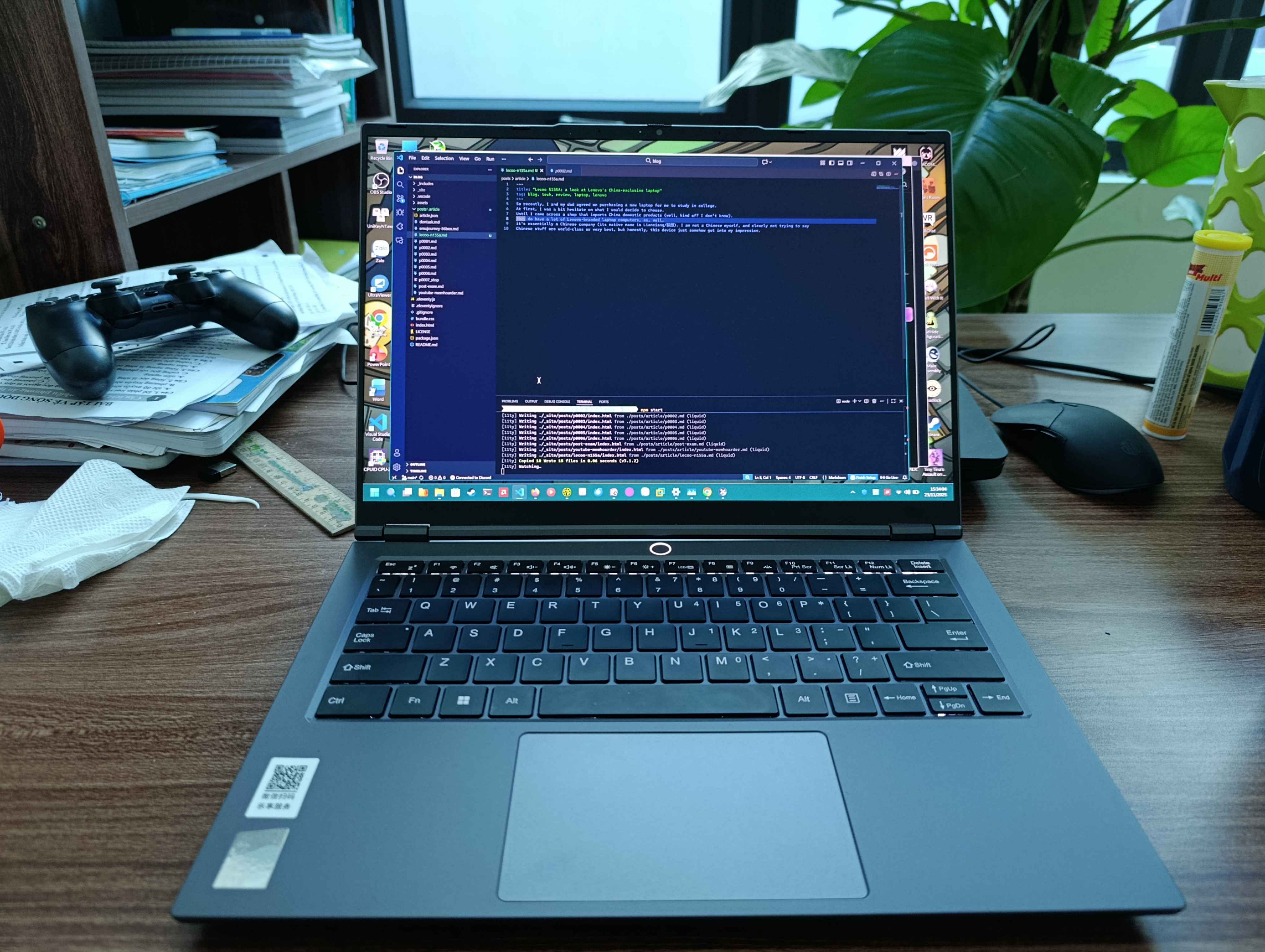
Visually looking, it is sleek and thin. I can even put it on the stool and work with it all days long.

The back side, as a random guy commented on a Discord chat, looks like it's inherited the design from Lenovo LOQ, a budget gaming laptop series.
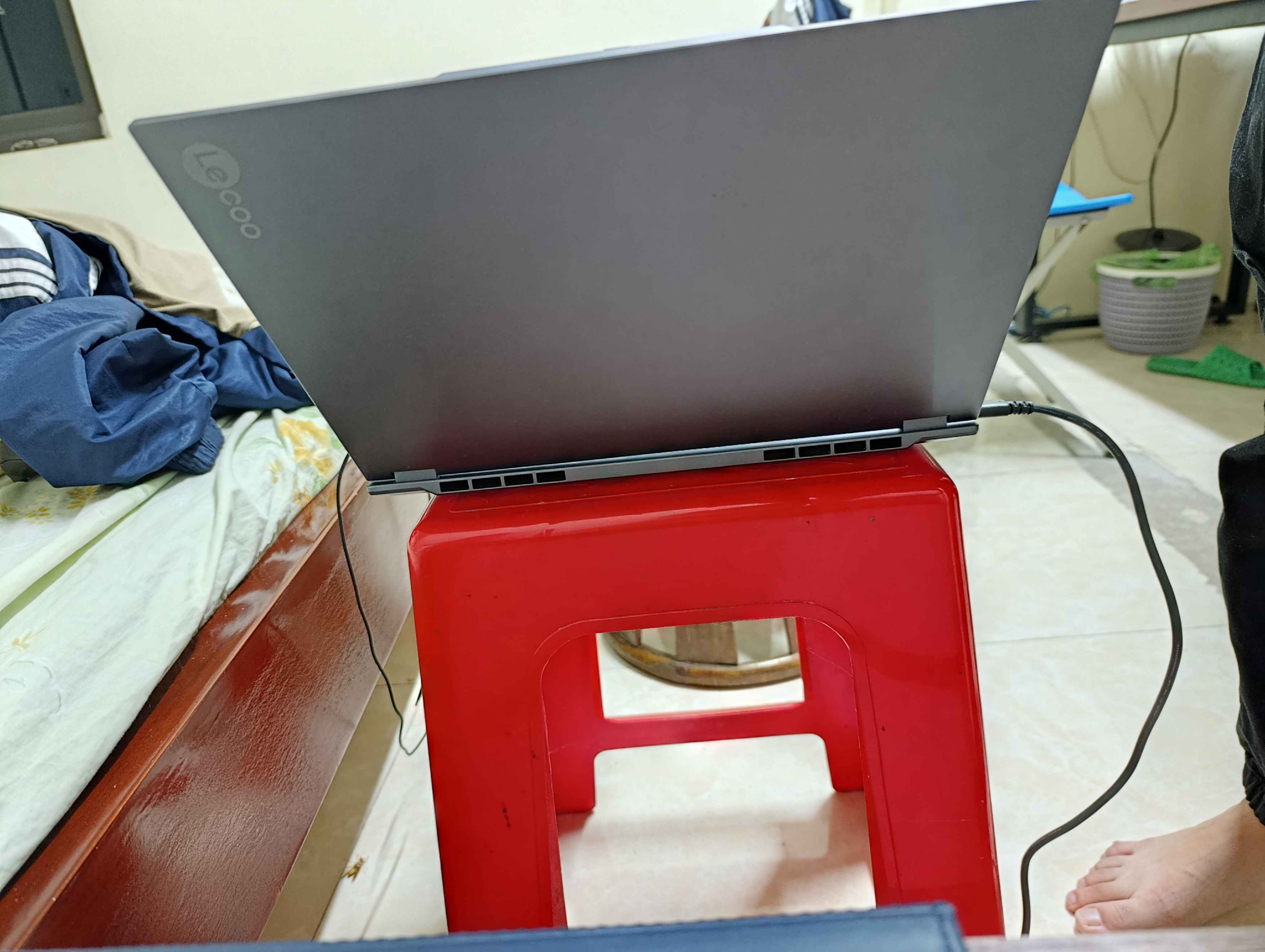
Its cooling is a system of two fans blowing to the two different clusters of vents located behind the laptop base. I'm not surprised since the CPU it's cooling isn't very much an ordinary laptop CPU, which is a performant one and would likely to generate tons of heat during its operation. Usually you will see a vast amount of non-gaming laptops having just a single fan cooling the CPU (of course, with heatsink and liquid conductor pipes).
On the lid, you can see that it looks incredibly minimal, with no other details than just the Lecoo wordmark.
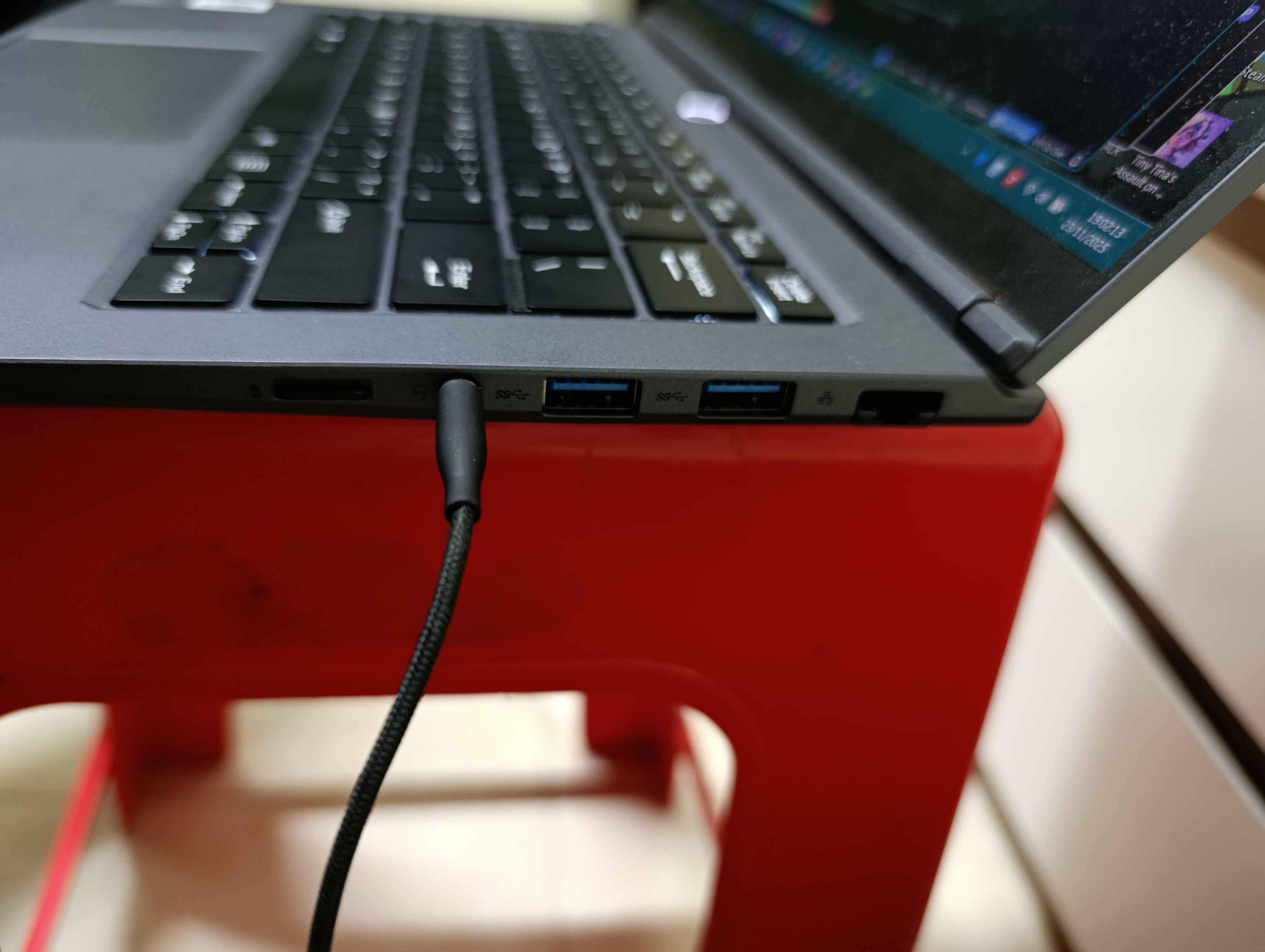
This picture would complete covering all five sides of the device. I may or may not picture the bottom side thinking it's not much important.
The keyboard (see the first picture) has a 65% layout with Home, End and Pg Up/Dn cut off. As a trade-off, the chiclet-form keys are larger and more comfortable to type on. Generally, I can compare this laptop to a MacBook Pro in appearance.
tech specs and performance
Talking something more techie, here is a table of tech specifications I've collected about this device:
| Items | Details |
|---|---|
| CPU | AMD Ryzen 7 H 255 (Zen 4, codenamed Hawk Point, 8c/16t, base 3.8GHz, up to 4.9GHz, 16MB L3 cache) |
| ... | (Possibly a Ryzen 7 8845HS equivalent?) |
| ... | (Edit: it's actually a Ryzen 7 260 w/out XDNA NPU) |
| GPU | AMD Radeon 780M (RDNA 3.0, codenamed Phoenix, 12 CUs, ~2.7GHz clock) |
| RAM | 32GB DDR5 5600MT/s (Techwinsemi/Micron chip), dual channel, support up to 96GB |
| SSD | 1TB PCIe Gen 4 NVMe SSD (Yangtze Memory-branded, 1/2 slots used, up to 8TB) |
| Display | 14-inch 2880x1800 IPS panel, 120Hz refresh rate, 400 nit max brightness, 100% sRGB colour pallete |
| Communication ports | 1x USB-C 4, 40Gbps w/ PD3.0 and DisplayPort output |
| ... | 1x USB-C 3.2, 10Gbps w/ PD3.0 and DP (same as above with halfass speed) |
| ... | 3x USB-A 3.2 Gen 1 |
| ... | 1x HDMI 2.1 |
| ... | 1x RJ45 Gaygabit Ethernet |
| ... | 1x microSD slot (SDXC?) |
| ... | 1x OCuLink (for connecting e-GPUs) |
| ... | 1x 3.5 millimetre headphone jack |
| Wireless comm. | Wi-Fi 6E, Bluetooth 5.2 (Realtek 8852BE PCIe NIC card) |
| Camera | 1080p webcam with physical privary shutter |
| Battery | 80Wh with PD3.0 charging (i.e. 100W max. thruput, estimated usage time 5-10hrs under light load) |
| Dimensions | 343 x 235 x 14 (millimetres), or 13.5 x 9.3 x 0.55 in |
| Weight | 1.43kg (3.1lbs) |
| Operating System | Windows 11 Home Simplified Chinese edition (stock, gets replaced with US English upon purchase) |
For connectivity, it's got all the ports I would need. Three high-speed USB-As? Thats a good deal. And two USB-C ports too. One of them has a slower data transfer speed which would easily be utilised as a charging port. But in fact both would have PD 3.0 support, so whichever port you would choose is fine. But the said slower port (USB-C 3.2 Gen 1, 10Gbps speed) is located closer to the top, so thats probably also a manufacturer's intention. That is also perhaps a common location for a charging inlet.
The inclusion of a microSD slot (instead of a full size SD one) and OCuLink port is also a huge plus. Given that, I've never really seen a laptop including OCuLink port. In fact, the second version of OCuLink interface (OCuLink-2) has already got the speed equivalent to a PCIe 4.0 x4 or x8 slot (8GB/s or 16GB/s). This has the potential to help users connect any peripherals that require high speed data transmission (i.e. a graphics card) to the laptop. I've seen many tinkering around with installing an eGPU to a laptop using USB-C port, but they usually have a significantly slower transfer speed.
I don't have a full size SD card, and probably aren't going to need one, while already have an 8 GB microSD card. The microSD card slot would at least play as a placeholder for my microSD card, since my phone can't hold a mSD card while having two SIM cards (the SIM2 and mSD slot are shared). I suppose that the mSD slot would support SDXC or SDUC, so it's also a good way to upgrade your laptop's storage while in instant need, without using a portable hard disk drive which require connecting to a USB port (that seems untidy for me seeing a wiring fuss being plugged in which would seem to make my machine less portable).
There is also a RJ45 Ethernet port, supporting 1Gbps max speed. Not many thin notebooks include this port anymore nowadays, so it's a plus for me also. I just like all the ports presenting there, although I would rarely use them, but just in case if I need any. I would tend to rely on the Wi-Fi connection all the time. Wi-Fi 6E seems like what I will need, though most of the time the 5GHz band is a thin wall away from me and I wouldn't get a great speed, just merely enough for watching 1080p YouTube and some torrent downloading. Bluetooth works just fine and supports multiple simultanously connecting devices (two or three, in my case).
Okay, talking the CPU. Now what do you think if an H-suffix CPU was placed in a laptop that was supposed to use a U-suffix one (as I assume so)? I mean, they did it. A real Ryzen powerhouse inside the chassis of a normal office laptop. And note the unusual SKU naming. This is a CPU marketted by AMD for domestic China market, thus used by domestic devices like this one. The CPU scored about 6400 in a CPU-Z benchmark, which you can see the result here. It was on par with the 8845HS. It was said to be identical to the 8745H, which is also a China domestic marketted CPU.
Beside just sitting around and doing benchmark, I have been using it right now in my everyday life. The memory boon seems like a miracle. No apps would ever use up to 32GB of installed memory. For most of the time, Windows and the boys' average usage is about half the way (15-16GB).
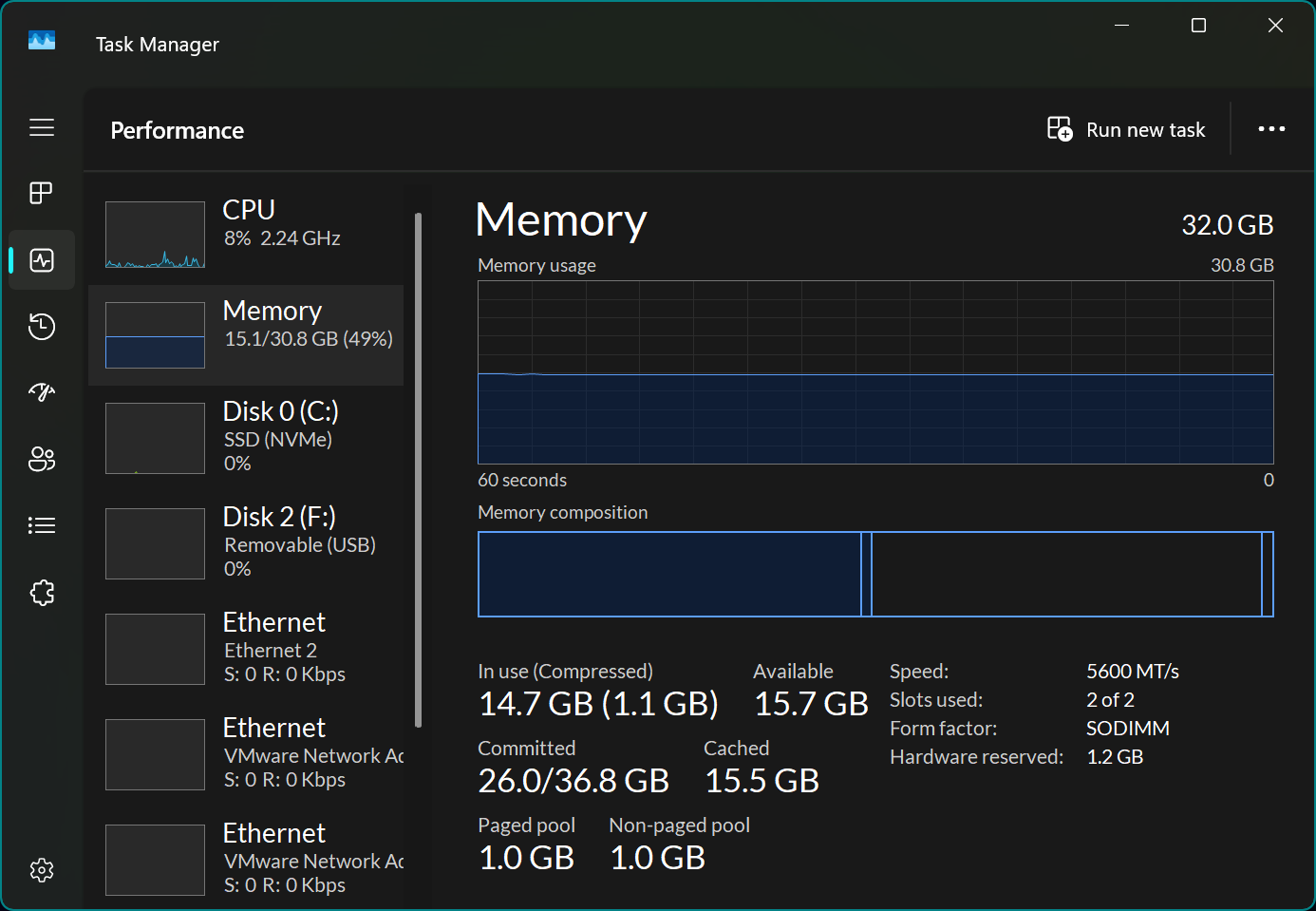
And the CPU is incredibly idle too. This would have included a few *active* Firefox tabs, Discord, Chrome, Visual Studio Code and some more.
Saying the Radeon 780M: actually, when GPU-Z (a software similar to CPU-Z for GPU info) looks up for the device using ID strings, the TechPowerUp website could not recognise the GPU is which (the texture rate and pixel rate were not identifiable by the software).

But after all, it functioned like a 780M, so I will assume it's a real 780M. It could have its ID strings changed due to it sharing package with a market-exclusive CPU model (atm, you can't find a Ryzen 7 H 255 specification page on TechPowerUp). These details really make up well for our today's story. I will talk about the scarcity of information later. Obtw, you can install AMD's Adrenalin software and in most case, the iGPU will happily adopt it.
Back to the CPU side. I've not tried video editing yet (which I will add later on), but for CPU-bound tasks, this laptop will handle just fine. I tried 86Box emulator with a 1995 Pentium 75 system, and it survived with 100% emulation speed almost all the time.
Can it game? Absolutely. Just... not that wonderful. The Radeon 780M is good (comparable to a GTX 1650), but gaming on a 3K (i.e. 2880x1800) resolution would significantly reduce the performance for relatively demanding games. In the bottlenecking scale, the GPU would be a limiting factor. I have to lower the res all the time, and tried using any sort of upscaling methods (ie FSR) where possible. Still, it is more comfortable than the older laptop I have (i5-7300HQ and GTX 1050).
Black Mesa got to run pretty good on there (around 60FPS, at 2560x1600 resolution).

As said, you can notice that the GPU is using 97% of its utilisation, while the CPU seems to be pretty laid-back with 18%. I would have tried more games, but haven't collected much detail about them, so expect to see some additions.
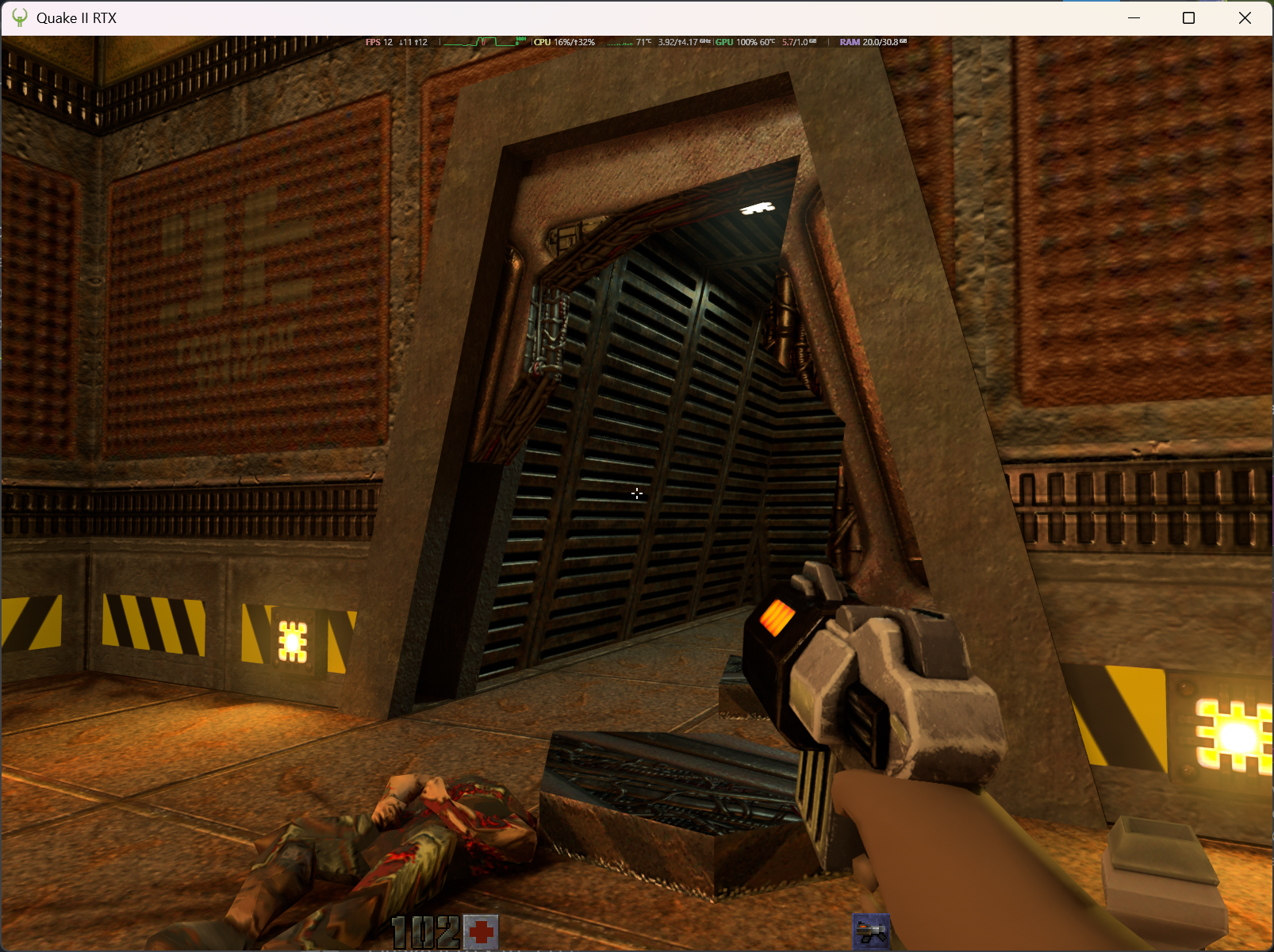
This Radeon 780M also supports ray tracing. Well, I told ya, it's a normal 780M with 12 rt cores. But it doesn't perform good like it's a gifted talent. In this Quake II RTX gameplay, I didn't expect it to reach 30fps. And yes, it didn't. AMD's ray tracing performance has been notoriously poor, just because it isn't GeForce RTX (yes, fuck you Nvidia proprietary dipshit). I don't hope Half-Life 2 RTX to run good on the device either.
Running the device on battery, I'd expect to see around 5-6 hours of battery life during casual tasks, and maybe up to 10-11 hours if it just sits there idly. If there are some gaming, then it would reduce to somewhere under 2 hours (assuming the CPU and GPU are running under their designed TDP of 45W).
The laptop runs pretty cool also. If it isn't gaming (during when the GPU would peak 55 Celsius/135 F), usually the GPU temp is 30 Celsius (~86 F) or so (I can't monitor the CPU, as some common hw monitor software tend to miss out the sensor for this strange CPU, but I guess it's not much higher).
Also not to forget, sometimes it's got some weird sleeping issues on Windows 11, when you wake it up but seeing a black screen while all the LEDs are lit. I have to do a force reboot every time I see it happening. Though recently I did try clearing CMOS configuration and changed an ACPI setting in BIOS setup, and it appears to have fixed the problem.
I also did upgrade BIOS. The only addition it brought is a quick power mode switcher at the press of the Fn + Q keystroke. I downloaded it from a Chinese Lenovo help centre website.
The bizzare Google result
Yes, to the fun part. And also the primary reason why I write this blog post. It's very hard, or even unable to find English-written sources containing information about this device. This is what you will see when searching for "Lecoo N155A" in Australia:
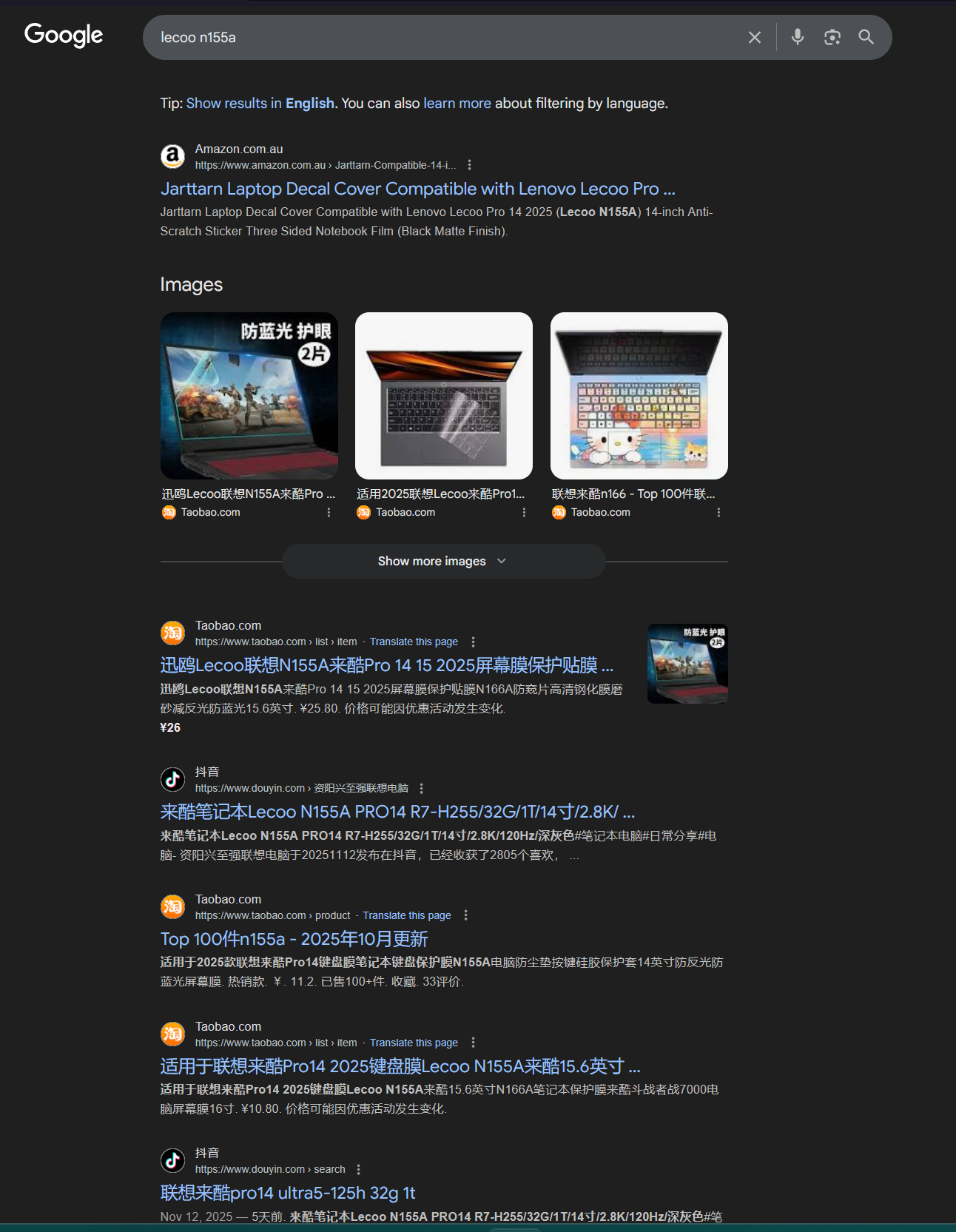
It's full of Taobao and TikTok/Douyin links lol. The only Amazon link isn't that worth-reading. It sells accessory rather than the machine itself. As I wrote earlier, this is like a rare thing in the Western world. There would be more Lecoo-branded products, like the new Lecoo Air 16 (N175L), but unfortunately I don't really own the device so I will not cover it in this blog post.
P/S: actually you can get some lucks seeing it listed on an AliExpress store page. But I didn't buy it thru AliEx, so I'm not very sure about that. Be careful of scamming though.
Conclusion
Overall, this is a fine laptop if you prefer a highly portable, small-sized laptop, but having a relatively good processor and a good battery altogether. It's kind of rare to see such a mostly-non-gaming laptop to have 32GB RAM preinstalled, imo. And it's probably going to be less seen in the western world. That would be how bizzare it is. It reminds me of some Chinese made hardware such as the Zhaoxin KaiXian series of CPU (most notably the KX-U6780A).
But ultimately, I hope that this blog post would be useful for anyone looking for some little information about this laptop, since at the moment of writing (24 Nov 2025), you will probably not be able to find a reliable information source about the laptop outside the China (and nearby countries') border.